
S-Diary1.85 - App Store
You'll be able to see results in few seconds.
Publisher Description
NOTICE:
- If you want to sync task/memo between iOS devices such as iPhone and iPad, turn on iCloud Sync (S-Diary Settings->Advanced->iCloud Sync). And turn on iOS iCloud document sync (iOS Settings->iCloud->Documents & Data).
- If you can't add any event, then check whether there are calendars in iOS Calendar. If there are no calendar, add a new calendar. And make the calendar checked in S-Diary calendar set. ( month-view -> the folder icon (second on top) -> edit -> check event section.
- Before sync calendars with iCloud,
Make backup file for all events.
After sync with iCloud, all meta data(such as color) of events will be deleted.
manage events, tasks and memos with one app, S Diary!
FEATURES:
-----Events Management--------------------------
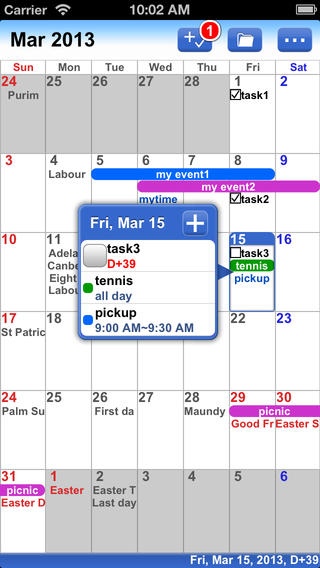
. all events sync with iOS calendar
. possible to set different color for each event
. custom RGB color support
. copy/cut/paste support
. lunar calendar support
. e-mail share support
. 3 type formats for all-day event, 5 type formats for time event in month view
. hide/show bottom popup in month view
. can preset calendars to change combination fast
-----Tasks and Memos Management----------------
. organize tasks and memos in folder
. all / today ( or monthly/weekly... ) / overdue / done folder support
. could manage tasks whether has due date or not.
. manage undated tasks/memos in list-view.
. sort into user-defined order/time/done or undone
. auto-move undone tasks today option support
. copy/cut/paste support
. e-mail share support
. could add photos to memo
. sync between iOS devices via iCloud
-----Various Views-------------------------------
. month, week, four days, day, list, search, agenda, year views support
. 5 skins, 15 fonts and 3 type of font size support
. landscape for all views support
. in month-view, popup and day size can be customized.
-----Universal App-------------------------------
. no need to buy another HD app for iPad.
. every UI designed for iPad differently
-----Holidays-----------------------------------
. US, UK, Korea, China, Japan holidays displayed
. each of holidays could be hidden / shown / shown in red
-----Backup/Restore-----------------------------
. could make backup of events, tasks and memos
. the backup file could be sent by e-mail
. backup file could be open in PC because it is plain text file
. possible to edit backup file in PC
. possible to restore contents partially
-----ETC---------------------------------------
. passcode lock support
. various badge options
. list registered alerts
. custom actiion support ( double tap, shake, zoom in/out, rotation )
Above all, it is easy to use and interesting!
Requires iOS 6.0 or later. Compatible with iPhone, iPad, and iPod touch.
About S-Diary
The company that develops S-Diary is Minuk Kim. The latest version released by its developer is 1.85.
To install S-Diary on your iOS device, just click the green Continue To App button above to start the installation process. The app is listed on our website since 2011-08-11 and was downloaded 0 times. We have already checked if the download link is safe, however for your own protection we recommend that you scan the downloaded app with your antivirus. Your antivirus may detect the S-Diary as malware if the download link is broken.
How to install S-Diary on your iOS device:
- Click on the Continue To App button on our website. This will redirect you to the App Store.
- Once the S-Diary is shown in the iTunes listing of your iOS device, you can start its download and installation. Tap on the GET button to the right of the app to start downloading it.
- If you are not logged-in the iOS appstore app, you'll be prompted for your your Apple ID and/or password.
- After S-Diary is downloaded, you'll see an INSTALL button to the right. Tap on it to start the actual installation of the iOS app.
- Once installation is finished you can tap on the OPEN button to start it. Its icon will also be added to your device home screen.
Program Details
System requirements
Download information
Pricing
Version History
version 1.85
posted on 2011-08-11
Disclaimer
Official App Store Link
We do not host S-Diary on our servers. We did not scan it for viruses, adware, spyware or other type of malware. This app is hosted by Apple and passed their terms and conditions to be listed there. We recommend caution when installing it.
The App Store link for S-Diary is provided to you by apps112.com without any warranties, representations or guarantees of any kind, so access it at your own risk.
If you have questions regarding this particular app contact the publisher directly. For questions about the functionalities of apps112.com contact us.
